PocketBook 614W: No Frontlight, No Touch, No Fuss
/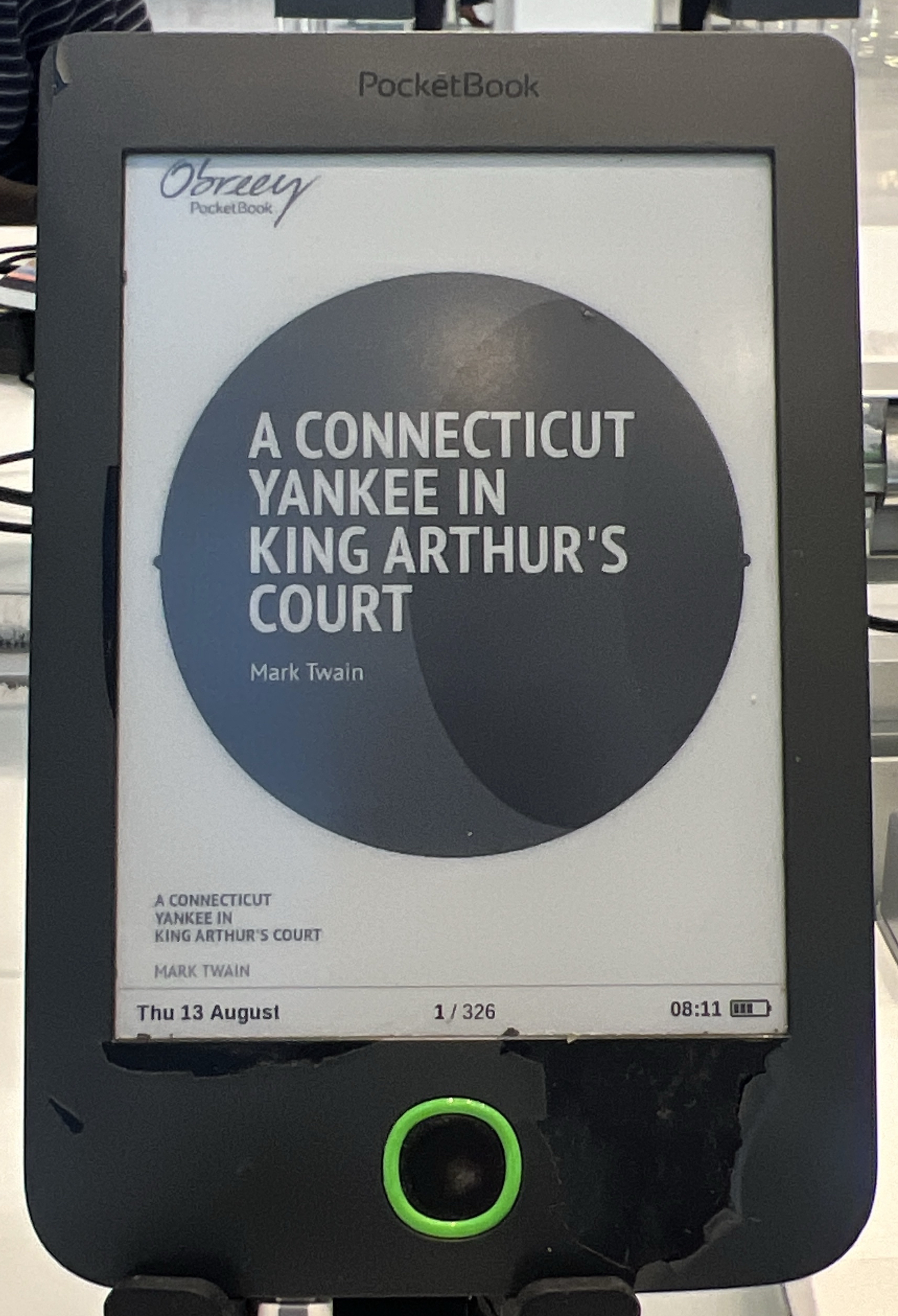
The photo we have of this device shows it open to A Connecticut Yankee in King Arthur’s Court — a nineteenth-century American novel about a man thrown backward through time into a world with none of the conveniences he takes for granted. It is, unintentionally, the perfect book to be reading on a PocketBook 614W, because this is a device with almost none of the conveniences you’d take for granted on any e-reader bought today. No touchscreen. No front light. Buttons, a screen, and Wi-Fi. That’s it.
What it actually is
The 614W is the Wi-Fi variant of what PocketBook marketed as the PocketBook Basic 2 — the “614” is the model number, and the “W” distinguishes the Wi-Fi-equipped version from a Wi-Fi-less sibling. It launched in January 2014, positioned as the cheapest entry point into PocketBook’s lineup: a stripped-down device for someone who wanted to read ebooks and didn’t want to pay for a touchscreen or a front light they might not use.
Specifications
| Screen | 6″ E Ink Pearl |
| Resolution | 800 × 600 |
| Front light | None — confirmed absent on this model |
| Touchscreen | None — button navigation only |
| Grey levels | 16 |
| Processor | 1 GHz |
| RAM | 256 MB |
| Storage | 4 GB internal, microSD to 32 GB |
| Battery | 1300 mAh |
| Connectivity | Wi-Fi |
| Dimensions | 174 × 115 × 8 mm |
| Weight | 188 g |
| Released | January 2014 |
Both traps flagged before writing this — the front light and the exact screen — check out as suspected. There is no front light on the 614W; PocketBook’s Basic line at this tier didn’t get one, and nothing in the specifications, the manual, or period coverage suggests otherwise. And the screen is an E Ink Pearl panel at 800 × 600, not the sharper Carta panels PocketBook was already shipping on higher-tier models in the same year. This was, deliberately, the budget option.
What it’s actually like to use — and what’s wrong with it
Everything about the 614W reads as a list of deliberate omissions rather than technical limitations of its era. By January 2014, touchscreens were already standard on mid-range e-readers from Kindle and Kobo, and front lights were becoming common on anything above entry level. PocketBook cut both, on purpose, to hit a lower price point, and left button navigation — a five-way or directional pad, depending on the exact revision — as the only way to move through menus and turn pages.
That’s a real trade-off, not just a nostalgia trip. Button navigation is, for many readers, genuinely more reliable than touch for the single most common action on an e-reader — turning the page — because there’s no risk of a mistimed tap doing something unintended. It’s also markedly worse for anything involving text entry, menu browsing, or dictionary lookups, where touch interfaces do real work that a directional pad can’t replicate gracefully.
The 800 × 600 Pearl screen is legible for body text at normal reading sizes but visibly less sharp than the 212 ppi-plus panels that were already standard on competing hardware in 2014, and the absence of a front light means this device is strictly a daylight-or-lamp reader — there’s no reading in bed with the lights off unless you add an external clip light.
Wi-Fi is present, which at least allows for wireless PocketBook Cloud sync and store access in regions where that’s supported, but with no front light and no touch, the 614W feels less like a compromise and more like a deliberately bare-bones product aimed squarely at price-sensitive buyers who wanted the cheapest possible way into ebooks.
Who should buy one now, if anyone
Almost nobody in 2026, and PocketBook itself has long since moved its budget tier onto devices with touchscreens as standard — there isn’t a direct “modern 614W” to point to, because the market segment it occupied (touchless, lightless, Wi-Fi-only budget reader) has essentially disappeared from PocketBook’s current lineup.
Buy one if: you specifically want button-only navigation for reliability reasons and don’t mind reading only in good light · you want the cheapest possible working e-reader for basic EPUB and PDF reading and don’t need a front light.
Do not buy one if: you want to read in bed, want a touchscreen, or want current-generation processing speed. For any of those, PocketBook’s current lineup — covered on our PocketBook hub — starts well above this tier as a baseline. Every current model has both touch and a front light.
If you’re weighing this against the broader question of whether an older, cheaper secondhand reader makes sense at all, our used e-reader guide is worth reading before you commit — it covers what actually fails on e-readers this old, battery capacity being the first thing to check.
Where to find one
The 614W is common enough on eBay — it sold in real volume as a budget option across Europe in 2014 and the years following, so supply isn’t the constraint. Battery age is the practical concern; an 1300 mAh cell over a decade old is likely to have lost meaningful capacity even on a device that otherwise still works fine.
Questions people actually ask
Does the PocketBook 614W have a front light?
No. This is confirmed across the manufacturer specifications and period coverage — it’s one of the clearest gaps in the device.
Does it have a touchscreen?
No. Navigation is entirely button-based.
What does the “W” in 614W mean?
Wi-Fi. The 614W is the Wi-Fi-equipped variant of the PocketBook Basic 2 (model 614); non-W variants existed without wireless connectivity.
What screen resolution does it actually use?
800 × 600 on a 6″ E Ink Pearl panel — noticeably lower resolution than PocketBook’s contemporaneous higher-tier Carta-screen models.
Sources: The eBook Reader on the PocketBook Basic 2 launch; manufacturer specification listings via e-ink-reader.ru device parameters; MobileRead Forums thread on the 614W Basic 2. Cross-referenced against multiple independent retailer spec listings for consistency.
This is one of the odd ones. If you own something stranger, we would like to see it — the Miscellaneous E-Readers section exists precisely for devices the rest of the internet forgot.
Disclosure: we earn a commission if you buy through links on this page. It costs you nothing and it keeps the lights on.