BOOX C67ML Carta Plus: Boox Before Boox Was Good
Disclosure: we earn a commission if you buy through links on this page. It costs you nothing and it keeps the lights on.
Contemporary reviewers of the Boox C67ML Carta Plus wrote, more or less verbatim, that the touchscreen took one to two seconds to respond to a tap, and sometimes did not respond at all. Read that sentence again and picture using it. Now consider that this is the same company that, a decade later, makes some of the most capable e-ink Android tablets on the market. Same idea. Same company. Barely-functioning execution.
That gap is the entire reason this device belongs in a miscellaneous-e-reader pile rather than a landfill: it is the missing link between “interesting idea nobody could build well” and “product people actually recommend.”
What it actually is
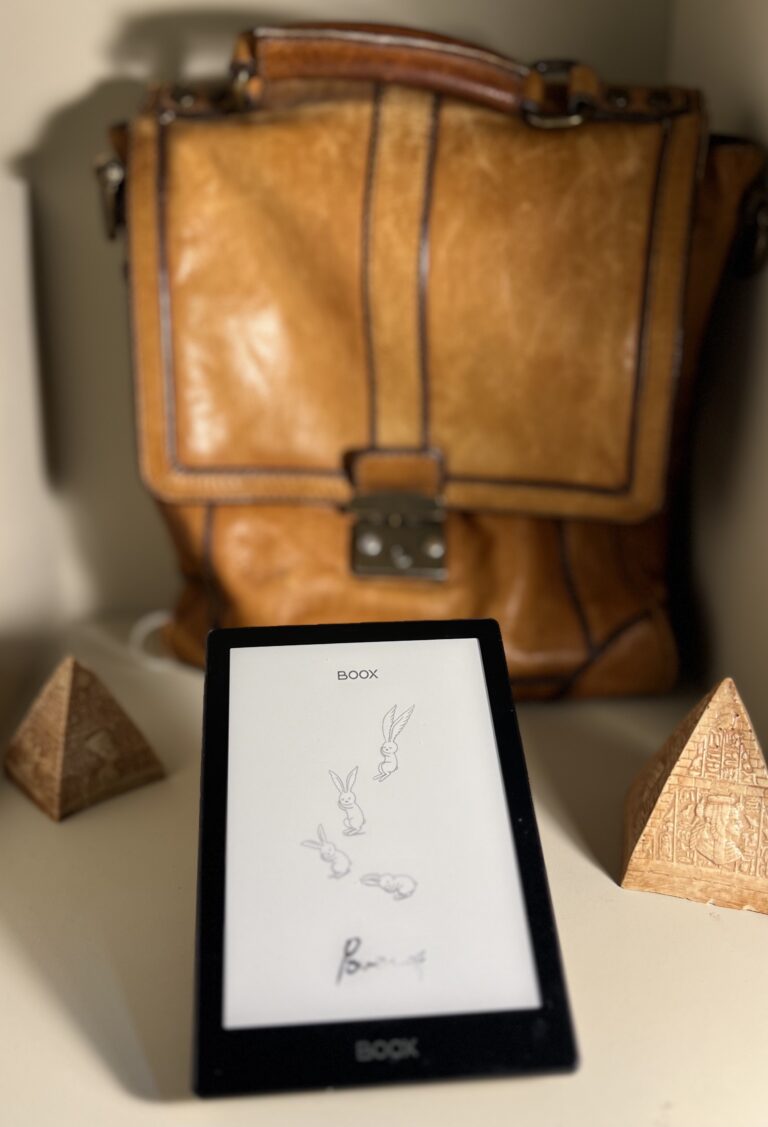
Onyx released the original Boox C67ML line in November 2014, and followed it with a Carta-screen refresh in May 2015 — the version most commonly found today, sold under names like C67ML Carta Plus. The core pitch was the same one Boox still makes: an Android tablet with an e-ink screen instead of an LCD, so you get app flexibility with e-paper’s battery life and eye comfort.
In 2015, that pitch ran into hardware that could barely support it. The Boox C67ML Carta Plus paired a 1.2 GHz dual-core Cortex-A9 processor — a bump up from the 1.0 GHz chip in the non-Carta original — with 512 MB of RAM and Android 4.2.2. Contemporary reviews were blunt about the result: touch response lag of one to two seconds was common, and outright non-response wasn’t rare either. This was not a snappy device even when new. It was Android running on hardware that had been sized for a much simpler job.
Specifications
| Screen | 6″, 1024 × 758, 212 ppi, E Ink Carta |
| OS | Android 4.2.2 |
| Processor | 1.2 GHz dual-core Cortex-A9 |
| RAM | 512 MB |
| Storage | 8 GB (double the original C67ML’s 4 GB) |
| Wi-Fi | 802.11 b/g/n |
| Expansion | microSD |
| Controls | Physical page-turn buttons |
| Dimensions | 171 × 117 × 9 mm |
| Weight | 187 g |
| First launched | November 2014 (C67ML); Carta refresh May 2015 |
What it’s actually like to use — and what’s wrong with it
The screen itself, an E Ink Carta panel at 212 ppi, is genuinely fine — this was a solid resolution for 2015, and text renders cleanly at normal reading sizes. That part of the device has aged reasonably well, because e-ink panels from this era don’t really improve with time; they either work or they don’t, and Carta panels have generally held up.
What hasn’t held up is everything wrapped around that screen. Android on 512 MB of RAM and a modest dual-core chip means the interface lags in ways that go beyond “e-ink is naturally slower than LCD” — this is genuine hardware strain, not just the expected refresh-rate compromise of the display technology. Opening apps, switching between them, and even basic touchscreen navigation could stutter or simply fail to register, according to reviewers who used it when it was new. If you’ve used a modern Boox device and found the touch response merely “a bit laggy compared to a phone,” the C67ML Carta’s lag is a different category of problem entirely.
The physical page-turn buttons are a genuine positive and one modern BOOX devices in the Poke line have mostly abandoned in favor of touch-only navigation — worth noting if you specifically miss physical buttons.
Who should buy one now, if anyone
Nobody should buy a Boox C67ML Carta Plus as a primary reading device in 2026. That’s not a close call — the touch lag alone would be a dealbreaker even before you get to the dated Android version, the 8 GB of storage, or the battery, which on an eleven-year-old device is very unlikely to hold meaningful charge without replacement.
Buy one if: you collect early Android-e-ink hardware and want to see where BOOX’s current lineup actually came from · you’re curious what “e-ink tablet” looked like before the category matured · you want physical page-turn buttons on a device you’re not depending on for daily reading.
Do not buy one if: you want a usable Android e-ink device today. For that, the honest answer is a current BOOX reader — and this is the device that makes the argument for that recommendation better than almost anything else in this collection. BOOX’s current devices are good because the company spent a decade being bad at exactly this, refining the same core idea through generation after generation of hardware that could finally support it. The C67ML Carta Plus is the receipt.
If you’re weighing a used purchase generally rather than this device specifically, our used e-reader guide walks through what to check on secondhand hardware before paying for it — battery condition chief among them for anything this old.
Where to find one
These surface occasionally on eBay, usually as a curiosity listing rather than a serious sale — sellers tend to know what they have here, given the device’s minor cult status among e-ink hardware collectors. Don’t expect a large market; this was a niche device even when new, and eleven years on it’s rarer still.
Ask about battery condition specifically before buying. A device this old that “still turns on” is a very different proposition from one that holds a charge through a normal reading session.
Questions people actually ask
Is the C67ML Carta Plus the same as the original C67ML?
No — the Carta Plus is the May 2015 refresh, with a Carta e-ink screen, a faster 1.2 GHz processor (up from 1.0 GHz), and double the storage at 8 GB versus the original’s 4 GB.
Can I install apps on it?
In principle, yes — it runs Android 4.2.2 and supports sideloading, consistent with BOOX’s whole product philosophy. In practice, expect the touch lag and limited RAM to make anything beyond the lightest apps frustrating.
Does it have a front light?
No front light is documented for this model — plan on reading in adequate ambient light or pairing it with an external lamp.
Why does this device matter if it barely worked?
Because it shows the current BOOX lineup wasn’t a sudden success — it was ten years of the same idea getting incrementally better hardware until the concept finally worked. If you’re deciding whether a modern BOOX device is worth buying, this is useful context for why the answer today is generally yes.
Sources: MobileRead Wiki: BOOX C67; The eBook Reader on the Carta refresh; eReaders.nl review. Specs as provided in the project research brief.
This is one of the odd ones. If you own something stranger, we would like to see it — the Miscellaneous E-Readers section exists precisely for devices the rest of the internet forgot.